Idempotency Keys: How to Retry an API Request Without Paying Twice
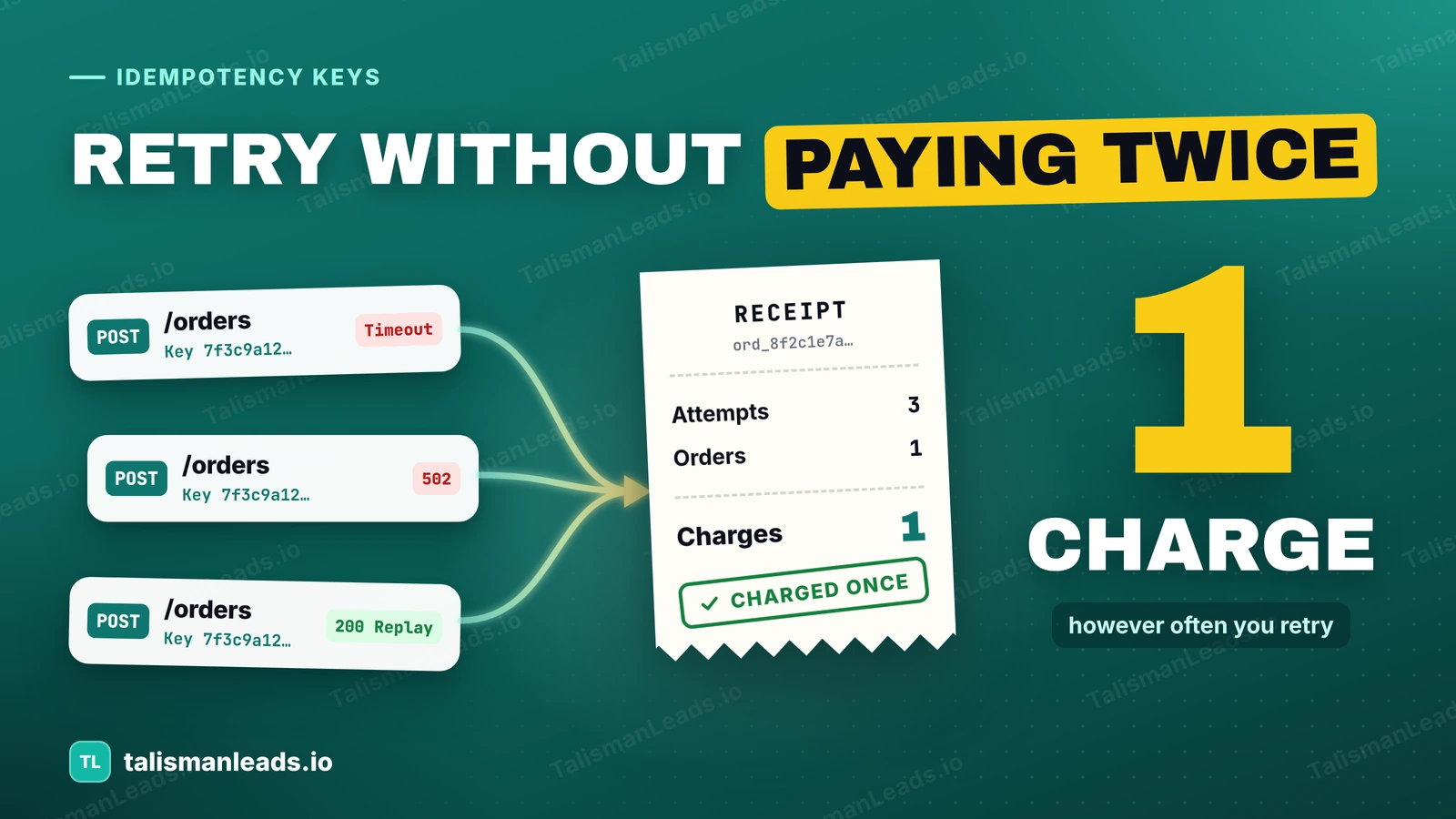
An idempotency key is a unique string you send with a request that costs money, so the server can tell a repeat of that request from a new one. If the answer is lost and you send the request again with the same key, you get the first result back instead of a second charge. On the TalismanLeads API the key goes in the Idempotency-Key header, it is required on POST /v1/orders, and it is remembered for 7 days. Below: exactly how the API treats a key, how to choose one, and a retry loop in Python and Node.js.
The problem: a timeout after the charge#
Your nightly job sends 50,000 customer emails to the Email Deliverability Checker. The order is $45.00 at $9.00 per 10,000 emails. Four minutes in, the connection drops and your HTTP client raises a timeout. Did the order go through?
You cannot tell. The request may never have reached the server, it may still be reading your list, or the order was placed and charged and only the answer was lost. From your side all three look the same.
Send the order again as a new request and, in the third case, you pay twice. Give up and you may have no order at all. When we designed the API, this lost answer was the first risk on the list, which is why it refuses an order without a key rather than leaving the key optional.
What an idempotency key is#
A request is idempotent when sending it twice has the same effect as sending it once. Reading an order's status is idempotent by nature: ask ten times, nothing changes. Placing an order is not: each POST normally creates something new.
The key makes it safe to repeat. You make up a unique string for one intended order and send it with the request; the server stores it with the order it created, and when the same key arrives again it answers with that order instead of placing another. The idea is an IETF draft standard, and payment APIs have used it for years.
The key stands for one order you mean to place, not one HTTP request. Every attempt at that order carries it, whether a retry a second later or a rerun of your script the next morning.
How the TalismanLeads API handles the key#
The rules, as the API applies them:
- Header:
Idempotency-Key, required onPOST /v1/orders, the one call that charges your balance. Without it the answer is 400idempotency_key_required. Reads,POST /v1/estimates(free) andPOST /v1/uploadstake no key. - Format: up to 200 visible ASCII characters, no spaces. A UUID fits; so does your own job id.
- Scope: a key belongs to your account, across all your API keys. Two programs on one account share the same space of keys, so give each its own prefix.
- Lifetime: 7 days from when the key was first sent. After that, the same key places a new order, so a retry that has waited for days should check
GET /v1/ordersfirst.
What comes back depends on what the key has seen before:
- A new key:
201 Createdand the new order. - The same key with the same request:
200 OK, the same order, and the headerIdempotent-Replay: true. Nothing more is charged, even if the price has changed since. - The same key with a different request: 409
idempotency_conflict. Nothing is placed. - The same key at the same moment (two attempts racing): one order and one charge. Each attempt gets that order, or an answer that means "send it again with the same key", such as
order_status_unknownorrate_limited. - The same key after a refusal such as
insufficient_balance: the order is tried again, so it goes through once you have topped up, at the price it was first quoted. If the price has changed by then, you get 409price_changed, and a new key orders at the new price.
"The same request" means the same checker, the same list (every entry, in the same order and spelling, or the same upload_id), the same country and the same expected_charge. Change any of them and it is a different request.
Two details come from how we built it. Many APIs answer "still in progress" with a 409 while the first attempt runs, as the IETF draft suggests. We left that out: the key stands for one order id from the moment it first arrives, so attempts at once all become that order, charged once. And repeating an order already placed does not count against your order rate limit, so a safe retry is never refused for being a retry.
When to repeat with the same key#
Repeat the same request, with the same key, after any answer that leaves the order unknown or not yet placed:
- no answer at all: a timeout or a dropped connection;
- an answer that is not JSON, such as a gateway's 502 or 504 page;
- 500
internal_error, and 503order_status_unknown,service_unavailableorapi_disabled; - 429
rate_limitedortoo_many_open_orders, after the seconds inRetry-After(see API Rate Limits and 429 Errors: Backing Off With Retry-After); - 400
quote_expired, and 402insufficient_balanceonce you have topped up.
Wait about a minute between repeats. If it still answers order_status_unknown after a few minutes, stop and contact support with the request_id. Do not make a new key.
A new key is right only when you mean a new order: you accept a new price after price_changed, your uploaded file changed (upload_changed), or an upload expired before you ever ordered from it (upload_not_found). An idempotency_conflict means your own code changed the request; fix that rather than retrying. Every code is explained in Verification API Errors: What Each Code Means and What to Do.
How to choose and keep a key#
One key per intended order, made before the first attempt and stored with the job that owns the order:
- When your system decides to order (a nightly re-check, a batch of new sign-ups), create the job record.
- Generate the key and save it in that record with the request body, or a pointer to the exact list file. A UUID works; so does your own job id with a prefix per system, such as
crm-recheck-2026-11-24-0042. - Send the order with that key. On a timeout or an unknown answer, read the key and body back from the record and repeat.
- Save the order's
idin the record when it comes back, then follow it withGET /v1/orders/{id}, as Quote, Order, Follow: How an Asynchronous Verification Job Works describes.
Saving the key before the first attempt is the step people skip. A key held only in memory dies with the process: after a crash or a redeploy mid-request, the rerun makes a fresh key, and a fresh key is a fresh order.
A safe retry loop in Python#
This places one order from a job file and is safe to run again: a retry after a crash or a rerun after a top-up uses the same key. It needs the requests package and your key in TALISMANLEADS_API_KEY.
import json
import os
import time
import uuid

import requests

API = os.environ.get("TALISMANLEADS_API_URL", "https://api.talismanleads.io/v1")
AUTH = {"Authorization": f"Bearer {os.environ['TALISMANLEADS_API_KEY']}"}

# Answers that mean "not placed yet, or not known yet": repeat with the same key.
REPEAT = {"order_status_unknown", "service_unavailable", "internal_error", "api_disabled",
          "rate_limited", "too_many_open_orders", "quote_expired"}


def save(path, job):
    with open(path, "w") as f:
        json.dump(job, f)


def new_job(path, checker, entries):
    """Make the key and the request once, and save both before the first attempt."""
    job = {"key": f"crm-recheck-{uuid.uuid4()}",
           "body": {"checker": checker, "entries": entries},
           "order_id": None}
    save(path, job)
    return job


def place_order(path, attempts=8):
    with open(path) as f:
        job = json.load(f)
    if job["order_id"]:
        return job["order_id"]  # placed on an earlier run

    for _ in range(attempts):
        try:
            r = requests.post(f"{API}/orders", json=job["body"], timeout=330,
                              headers={**AUTH, "Idempotency-Key": job["key"]})
        except requests.RequestException:
            time.sleep(60)  # timed out or cut off: it may have been placed
            continue
        try:
            body = r.json()
        except ValueError:
            body = None  # a gateway's 502 or 504 page is not JSON

        if r.status_code in (200, 201):
            job["order_id"] = body["id"]
            save(path, job)
            replayed = r.headers.get("Idempotent-Replay") == "true"
            print("Order", body["id"], "(found again)" if replayed else "(new)")
            return body["id"]

        error = (body or {}).get("error", {})
        if body is None or error.get("code") in REPEAT:
            wait = r.headers.get("Retry-After", "")
            time.sleep(int(wait) if wait.isdigit() else 60)
            continue
        # Repeating will not change this answer. The key stays in the job file,
        # so after a top-up, say, running this again resumes the same order.
        raise RuntimeError(f"{error.get('code')}: {error.get('message')} "
                           f"(request {error.get('request_id')})")

    raise RuntimeError("Still not confirmed. Contact support with the last request_id; "
                       "do not make a new key.")


if __name__ == "__main__":
    JOB = "job-2026-11-24.json"
    if not os.path.exists(JOB):
        new_job(JOB, "email_deliverability_checker",
                ["jane@example.com", "sam@example.net", "lee@example.org"])
    place_order(JOB)
The key is written to disk before the first request, every repeat sends the body read back from the same file, and the timeout is 330 seconds because a large list can take up to five minutes to read.
The same loop in Node.js#
For Node.js 18 or later, which has fetch built in. Save it as place_order.mjs.
import { randomUUID } from "node:crypto";
import { existsSync } from "node:fs";
import { readFile, writeFile } from "node:fs/promises";

const API = process.env.TALISMANLEADS_API_URL ?? "https://api.talismanleads.io/v1";
const AUTH = { Authorization: `Bearer ${process.env.TALISMANLEADS_API_KEY}` };
const sleep = (seconds) => new Promise((done) => setTimeout(done, seconds * 1000));

// Answers that mean "not placed yet, or not known yet": repeat with the same key.
const REPEAT = new Set(["order_status_unknown", "service_unavailable", "internal_error", "api_disabled",
  "rate_limited", "too_many_open_orders", "quote_expired"]);

const save = (path, job) => writeFile(path, JSON.stringify(job));

// Make the key and the request once, and save both before the first attempt.
async function newJob(path, checker, entries) {
  const job = { key: `crm-recheck-${randomUUID()}`, body: { checker, entries }, orderId: null };
  await save(path, job);
  return job;
}

async function placeOrder(path, attempts = 8) {
  const job = JSON.parse(await readFile(path, "utf8"));
  if (job.orderId) return job.orderId; // placed on an earlier run

  for (let i = 0; i < attempts; i++) {
    let r;
    try {
      r = await fetch(`${API}/orders`, {
        method: "POST",
        headers: { ...AUTH, "Content-Type": "application/json", "Idempotency-Key": job.key },
        body: JSON.stringify(job.body),
        signal: AbortSignal.timeout(330_000),
      });
    } catch {
      await sleep(60); // timed out or cut off: it may have been placed
      continue;
    }
    const body = await r.json().catch(() => null); // a gateway's 502 or 504 page is not JSON

    if (r.status === 200 || r.status === 201) {
      job.orderId = body.id;
      await save(path, job);
      const replayed = r.headers.get("Idempotent-Replay") === "true";
      console.log("Order", body.id, replayed ? "(found again)" : "(new)");
      return body.id;
    }

    const error = body?.error ?? {};
    if (!body || REPEAT.has(error.code)) {
      await sleep(Number(r.headers.get("Retry-After")) || 60);
      continue;
    }
    // Repeating will not change this answer. The key stays in the job file,
    // so after a top-up, say, running this again resumes the same order.
    throw new Error(`${error.code}: ${error.message} (request ${error.request_id})`);
  }
  throw new Error("Still not confirmed. Contact support with the last request_id; do not make a new key.");
}

const JOB = "job-2026-11-24.json";
if (!existsSync(JOB)) {
  await newJob(JOB, "email_deliverability_checker", ["jane@example.com", "sam@example.net", "lee@example.org"]);
}
await placeOrder(JOB);
We ran both scripts against a stand-in for the API that placed the order and then lost the answer, sent a gateway's 502 page, a 429 with Retry-After, and an order_status_unknown. Each waited, repeated with the same key and got the one order back with Idempotent-Replay: true: one charge. A run refused for insufficient_balance placed the order on the next run, under the same key. In production, a job file would be a row in your database; the logic is the same.
Common mistakes#
A new key for every retry#
The most common bug: uuid4() called inside the retry loop, or in the function that sends the request. Every retry is then a new order. Keys are made once per order, outside the loop. A new key does not even buy a fresh check: the same list on the same checker within about a day, under a new key, is charged again and can return your earlier result.
One key reused for different lists#
A fixed key such as daily-recheck fails in two ways. Tomorrow's list differs, so the API answers idempotency_conflict and nothing runs. Or the list happens to be the same, and within 7 days the API returns yesterday's order: no new check, no charge, and a job that looks done. Put the date or the job id in the key. Re-Checking a Customer List on a Schedule With the API shows a schedule built this way.
Rebuilding the request on retry#
If a retry re-reads your CRM, the list may have gained a row or come back in another order. A fresh estimate may give a different expected_charge. Either one makes it a different request, and the answer is idempotency_conflict. Keep the body (or the exact file or upload_id) with the key, and repeat it byte for byte.
Treating a timeout as a failure#
A timed-out order may be placed, charged and already running. Marking the job "failed" and alerting someone invites a manual re-run under a new key. Mark it "unknown" and repeat with the same key until you have the order's id.
Frequently asked questions#
What is an idempotency key in an API?#
A unique string sent with a request that has side effects, such as a paid order, so that a repeat with the same key returns the first result instead of doing the work, and charging, again.
Do I need an idempotency key on every TalismanLeads API call?#
No. Only POST /v1/orders takes one, and there it is required. Reads are safe to repeat, an estimate charges nothing, and an upload link costs nothing.
How long does TalismanLeads remember an idempotency key?#
For 7 days from when it was first sent. Within that window the same key and request return the same order; after it, the key places a new order.
Is a UUID a good idempotency key?#
Yes. A random UUID is unique without coordination. Your own job id works too and is easier to trace in logs. Either way, add a prefix per system, because keys are shared across all the API keys on your account.
Do API keys and idempotency keys have anything to do with each other?#
No. The API key in the Authorization header says who you are and must stay secret (API Key Security: Creating, Storing and Rotating Your Keys). The idempotency key names one order; it is not a secret, though it should be unique.
The full rules are on the Safe retries page of the API documentation. Estimates are free, so you can try the flow with your own list before you order; businesses can apply for a $5, 14-day free trial to test the API on their own data.
Was this helpful?