How to Check If a Phone Number Is on Signal
To check whether one phone number is on Signal, type it into Signal's New Message screen: if an account can be found by that number, Signal offers to message it. To check a whole customer list, run a bulk registration check, which marks each number registered or not registered without sending anything. Either way, remember that since 2024 Signal users can hide from number search, so "not registered" means "not found by number", not "not on Signal".
This guide is for businesses deciding whether Signal is worth offering to their own customers. It covers both ways to check, what the result can and cannot tell you, and what a business can realistically use Signal for.
Check one number in the Signal app#
Open Signal and start a new chat (the pencil icon).
Type the full number with its country code, for example +1 512 555 0142.
If an account can be found by that number, Signal shows it and lets you send a message request. If not, it tells you the number isn't on Signal, or that it can't find it.
Typing a number does not send anything or tell the person. Sending a message request does: the other person sees it and can accept, reject or block it. For one number that's fine. For a list of customers, checking one by one isn't practical.
Check a whole customer list at once#
A bulk registration check runs your whole file in one go and returns, for each number, whether it is registered on Signal. On TalismanLeads the Signal Number Checker works like this:
Save your customers' numbers as a plain .txt file, one per line, with the country code (E.164), for example +15125550142.
Upload it and choose the Signal check. The exact price shows before anything is charged.
Download the result file a few minutes later.
What comes back is deliberately small: the number exactly as checked, and registered or not registered, plus a count of each. No name, photo or last-seen time is returned, because Signal shares very little. Nothing is sent to the numbers and nobody is added as a contact.
It costs $2.50 per 10,000 numbers. Each file is billed as at least 2,000 numbers, top-ups start at $5, and a check that cannot be completed is refunded to your balance. Businesses can try it on their own list with a $5, 14-day free trial. If you run checks from your own systems, the same checker is available through the API as signal_number_checker.
What a "not registered" result really means#
In February 2024 Signal changed how phone numbers work in the app (Signal):
Phone numbers are hidden by default from people who don't already have them saved in their contacts.
Usernames let people start a chat without sharing a number at all. You still need a phone number to sign up.
A new setting, "Who can find me by my number", decides whether someone who types your number into Signal can find you. It defaults to "Everybody". Set to "Nobody", someone entering the number can't message you "or even see that you're on Signal", in Signal's own words.
So a registration check by number can only find accounts that allow it. In practice:
Registered means an account can be found by that number today.
Not registered means no account was found by that number. The person may have no Signal account, or may have chosen to be found only by username.
Most people keep the default, so the check still shows you roughly how much of your list is reachable there. Treat the registered count as a floor, not an exact total.
Should you offer Signal to your customers?#
Signal is a personal messenger built around privacy. Messages and calls between Signal users are end-to-end encrypted by default, with no setting to turn on (EFF Surveillance Self-Defense). That is exactly why some customers prefer it, and why it works differently from business messaging channels:
There are no business tools. Signal offers no business accounts, no messaging API and no templates.
Bulk sending is against the rules. Signal's terms forbid using it for bulk messaging, auto-messaging and auto-dialing.
That leaves one honest use: a conversation channel your customers choose. List a Signal username or number on your contact page, staffed by real people, so customers who prefer Signal can reach you there. A registration check helps you decide whether it's worth the staff time: if only a sliver of your customers can be found on Signal, your effort is better spent elsewhere.
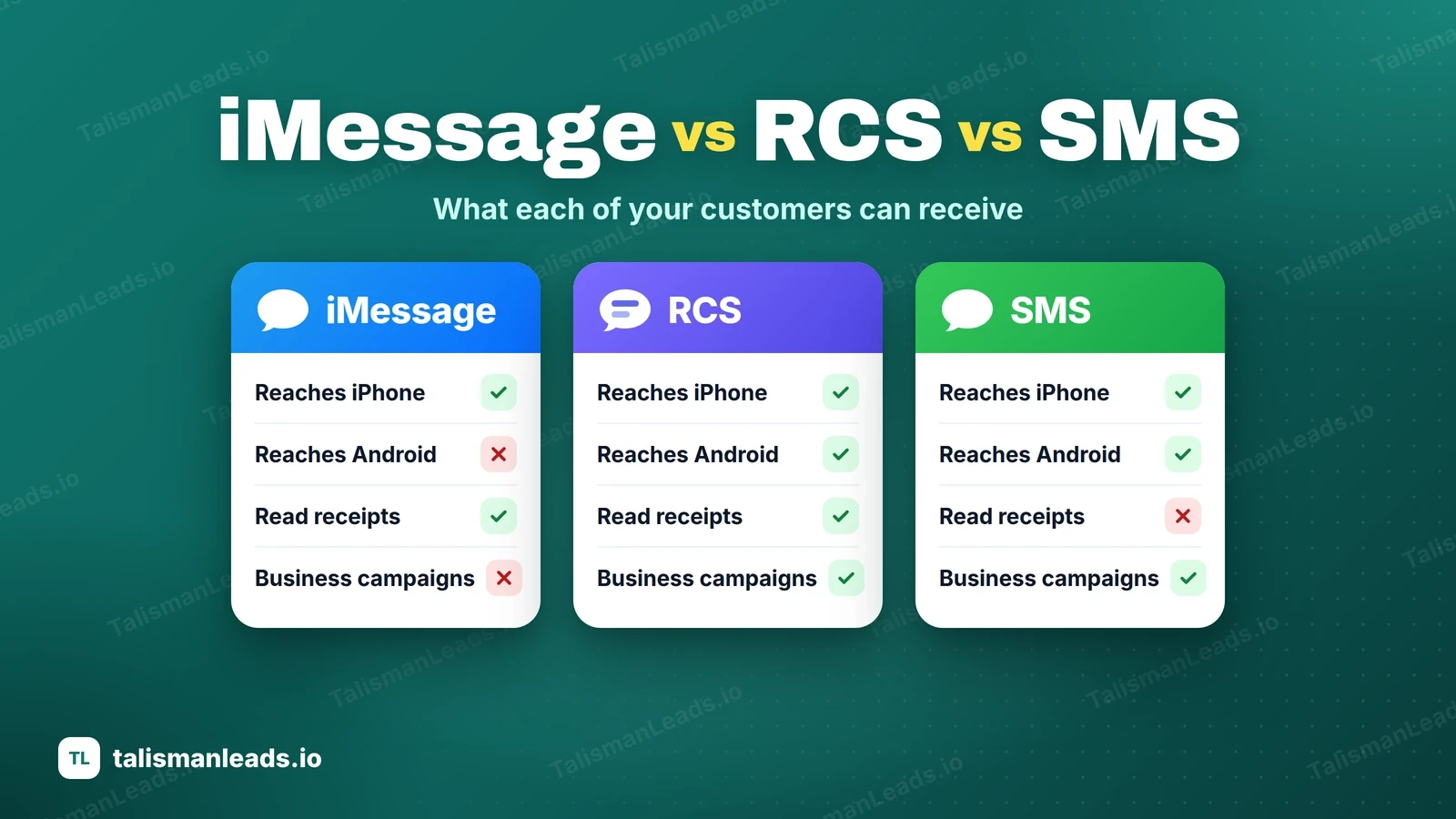
For anything sent to many people at once, such as order updates, reminders or promotions, use channels built for it: SMS, which reaches every mobile, and RCS, which adds rich features where supported. Our guide to iMessage vs RCS vs SMS explains which of your customers can get which.
Use the results responsibly#
Check your own customers only: numbers people gave you, for a purpose they would expect.
Use the result to plan, not to reach out. A registered result is not permission to message anyone on Signal. Let customers come to you.
Keep the results to yourself, with your customer records, and delete them when you no longer need them.
Check again before you rely on old results. People change settings, numbers and apps.
Frequently asked questions#
How can I tell if someone has Signal?#
For one number, type it into Signal's New Message screen: if an account can be found by that number, Signal shows it. For a list, a bulk registration check marks each number registered or not registered without sending anything.
Can a Signal check show someone's name or photo?#
No. A registration check only says whether an account can be found by the number. Signal shares very little, and the check returns no name, photo or last-seen time.
Why does a number show as not on Signal when the person uses it?#
Since 2024, Signal users can set "Who can find me by my number" to "Nobody". Their account then can't be found by number, in the app or by any check, even though they use Signal. They can still be reached by their username, if they share it.
Will the person know I checked their number?#
Typing a number into Signal's New Message screen or running a bulk check doesn't notify anyone. Sending a message request does.
Can a business send messages to customers on Signal?#
Only one-to-one, as a person would. Signal has no business tools, and its terms forbid bulk messaging, auto-messaging and auto-dialing. For campaigns and alerts, use SMS or RCS.
How much does a bulk Signal check cost?#
$2.50 per 10,000 numbers on TalismanLeads, with every file billed as at least 2,000 numbers. The exact price shows before you confirm.
See how much of your customer list can be found on Signal with the Signal Number Checker before you decide whether to offer it.
Was this helpful?