E.164 Format Explained: How to Write Any Phone Number
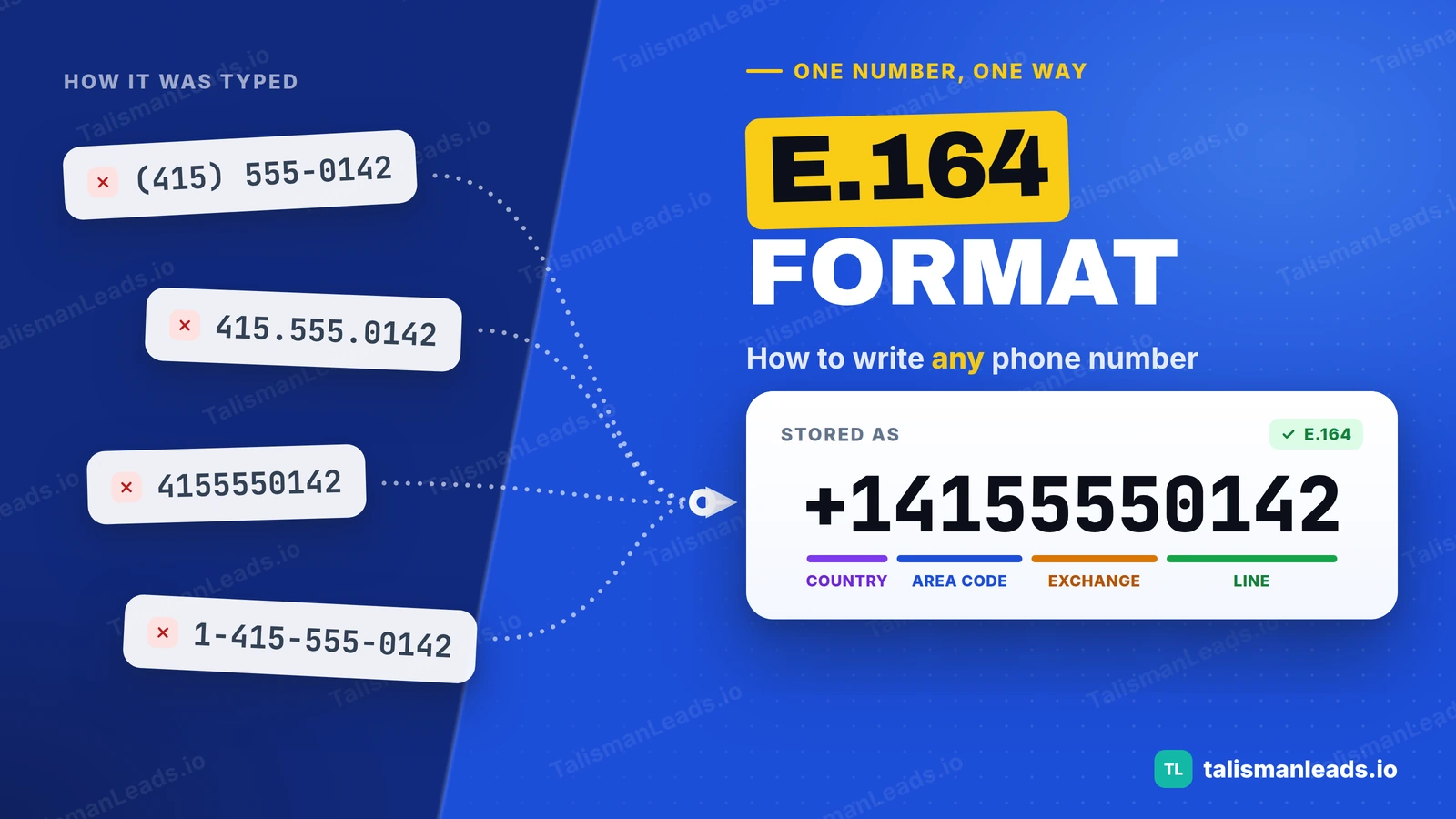
E.164 is the international format for phone numbers: a plus sign, the country code, then the rest of the number, with no spaces, dashes or brackets, and never more than 15 digits. The US number (415) 555-0142 is written +14155550142. It means the same number from any country, which is why SMS platforms, CRMs and number checkers ask for it. Below: how to convert the forms people actually type, what spreadsheets do to numbers, and how to store them so they stay clean.
What E.164 format is#
E.164 is a Recommendation of the ITU, the UN agency for telecommunications: "The international public telecommunication numbering plan", whose current edition was approved in February 2026. Three of its rules matter when you write a number down:
- A number starts with its country code, which is 1 to 3 digits long: 1 for the US and Canada, 44 for the UK, 49 for Germany.
- The whole number is at most 15 digits, country code included. The international prefix you dial to leave your own country is not counted.
- After the country code comes the national significant number: the number as known inside the country, minus any prefix dialled for domestic calls.
The plus sign comes from a companion Recommendation, ITU-T E.123, which says the symbol for the international prefix should be "+". The plus stands for "whatever you dial to call abroad from here", so the number works from any country and any mobile phone.
In software, E.164 means the strict form: plus and digits, nothing else. Google's libphonenumber, the numbering library much phone software is built on, defines its E.164 output as the international format "with no formatting applied". +1 415 555 0142 is the same number written for people; +14155550142 is the form to store.
How a US number is built#
The US shares country code 1 with Canada and other members of the North American Numbering Plan: 20 countries in all. Every number in the plan is ten digits after the 1, in three parts:
- Area code (415): three digits, the first of them 2 to 9.
- Exchange, or central office code (555): three digits, the first of them 2 to 9. NANPA calls it the CO code, also known as an exchange or prefix.
- Line number (0142): the last four digits.
So a US number in E.164 is always the plus, the 1 and ten digits. Who hands out area codes and exchanges, and how numbers reach a carrier, is in Area Codes, Number Blocks and Carriers: Who Issues a US Number.
For examples and test data, use the fictional range: NANPA keeps 555-0100 through 555-0199 "reserved for entertainment/advertising", so +14155550142 reaches no one. Every US number in this guide comes from it.
National, international and dialled forms#
Customer lists are written the way people dial at home, and two kinds of prefix get in the way.
The trunk prefix is the digit dialled before a number for a call within the country. In the US and Canada it is 1 (1-415-555-0142); in the UK, Germany and much of the world it is 0 (the ITU's dialling procedures list each country's). E.164 leaves it out of the national significant number, so it is dropped when the country code is added: Ofcom's drama number 020 7946 0123 becomes +442079460123, not +4402079460123.
The exit code, or international prefix, is what you dial to leave your country: 011 from the US and Canada, 00 from the UK, Germany and most other countries (00 is the ITU's recommended prefix). It is never stored: the plus replaces it, so 00 1 415 555 0142 dialled from London is stored as +14155550142.
To turn any written number into E.164:
- Remove spaces, dots, dashes and brackets.
- If it starts with an exit code (011 or 00), replace that with a plus: the country code already follows.
- Otherwise, drop the trunk prefix (a leading 1 in the US, 0 in the UK) and put a plus and the country code in front.
For reading, E.123 writes the international form with spaces between the groups, +1 415 555 0142, and says brackets should not be used in an international number. Keep that for display; store the plain form.
Extensions are not part of E.164#
E.164 has no place for an extension: the format ends with the number that reaches the line. E.123 writes an extension after the number with the word for "extension" ("+1 415 555 0142 ext. 12"), and the tel: address used on web pages adds it as a parameter, ";ext=12" (RFC 3966).
In a list or a CRM, the number goes in the phone column in E.164 and the extension in a column of its own. Tools that read numbers will not keep "x12" for you, as the cleaner's rules below show.
What spreadsheets do to phone numbers#
A spreadsheet treats a phone number as a number and changes it as you type, paste or open a file:
- The plus disappears. Type +14155550142 into an ordinary cell and the spreadsheet reads the plus as a sign, storing 14155550142.
- Long numbers turn into scientific notation. Excel's General format uses scientific notation for numbers of 12 or more digits, so the UK number 442079460123 shows as 4.42079E+11. Excel also keeps only 15 significant digits; a longer string of digits has its end turned into zeros.
- Leading zeros vanish. Excel removes leading zeros, so 020 7946 0123 becomes 2079460123.
How to fix it:
- Format the phone column as Text before typing or pasting, so numbers keep their plus and zeros.
- Import a CSV (in Excel, Data → From Text/CSV) and set the phone column to Text, rather than double-clicking the file.
- A column showing 4.42079E+11 usually still holds the full number: set its format to Text or to a number with no decimals before copying or exporting.
- A lost plus or zero can be put back by a cleaner that knows the country (below). A digit Excel turned into a zero cannot: go back to the source.
How to store phone numbers in a CRM#
Once numbers are clean, keep them that way:
- One phone column in E.164: +14155550142 and nothing else, no spaces, labels or second number.
- Format for display, not in storage. Show (415) 555-0142 or +1 415 555 0142 on screen, made from the stored value.
- The extension in its own column, and the kind of phone (mobile, work) in another.
- Convert at the door. Ask for the country on your forms and convert to E.164 on save, so a bad number is caught while the customer can still fix it.
- Match on E.164, so (415) 555-0142 and 415.555.0142 are recognised as one customer.
Format is only the first check. A number can be perfectly written and still be a landline that cannot receive a text (Landline or Mobile? How to Check a US Number Before You Text), or belong to someone new (Why Phone Lists Go Stale).
How the free Number Cleaner turns a list into E.164#
TalismanLeads' Number Cleaner is free with a free account (Free Tools → Number Cleaner), up to 200,000 lines per run. From its code, it:
- Splits the list at every line break, comma and semicolon.
- Strips spaces, brackets, dots and dashes, and turns a leading 00 into a plus.
- Reads each number with libphonenumber's data, using the default country you choose for lines without a country code. With no default country, bare digits are read as if they started with a plus.
- Removes numbers that are not valid in their country's plan, duplicates (compared in E.164) and, if you tick it, numbers that are not mobile.
- Writes the kept numbers in E.164, international or national form, and lists every removed line with its reason in a CSV, so nothing disappears silently.
The same cleaner runs in the TalismanLeads Telegram bot, with no default country, so there every line needs its country code. The whole routine before a campaign is in How to Prepare and Validate a Phone List Before a Campaign.
Why the cleaner changes or removes a line#
We ran fictional numbers through the cleaner's code to see these:
- A US number without +1, and no default country. The digits are read as international: 2015550142 becomes +2015550142, a number in Egypt. Of 1,776 test lines (every area code libphonenumber accepts, four line numbers each), 193, about one in nine, came out as a valid number in another country; the other 1,583 were removed. Set the default country whenever numbers lack a country code.
- 011 at the start. The cleaner understands 00 on its own, but 011 only with the default country set to United States.
- An extension. With United States set, "415-555-0142 x12" is kept as +14155550142, extension dropped; with no default country, it is removed.
- Scientific notation. A line such as 4.42079E+11 is removed as invalid: the digits are no longer there to read.
- No area code. A seven-digit number such as 555-0142 is removed.
- Two numbers, or a name, on one line. "(415) 555-0142 / (415) 555-0143" is removed. A comma splits a line, so "Smith, (415) 555-0142" keeps the number and lists "Smith" as an invalid line. Load the phone column alone, not the whole export.
- A foreign number without its country code. With United States set, any ten-digit line is read as a US number: the UK's 020 7946 0123, its zero lost in a spreadsheet, arrives as 2079460123 and comes out as +12079460123, a valid number in Maine's area code and the wrong person. With United Kingdom set, it gives the right +442079460123. Clean a mixed list one country at a time.
Frequently asked questions#
What is an E.164 phone number?#
A phone number written in the international format set by ITU-T Recommendation E.164: a plus, the country code and the national number, with no spaces or punctuation and at most 15 digits. For example, +14155550142.
How do I write a US number in E.164?#
Write +1, then the ten digits of the area code, exchange and line number with nothing between them: (415) 555-0142 becomes +14155550142. If it starts with 1 or 011 1, drop that first.
Is E.164 the same as international format?#
Nearly. The international format written for people has spaces (+1 415 555 0142); E.164 as systems use it has none (+14155550142).
How many digits can an E.164 number have?#
At most 15, country code included and the plus not counted. A US number has 11.
Why does Excel remove the plus and leading zeros from phone numbers?#
Because it reads the cell as a number: the plus becomes a sign, leading zeros are dropped, and 12 or more digits are shown in scientific notation. Format the column as Text before you type, paste or import.
To put a whole list into E.164 in one pass, sign up for free and open the Number Cleaner in Free Tools.
Was this helpful?